


NewsBang: Deep Dive News Daily
4.324.00 Reviews
App Specs
- Version
- 1.8.1
- Updated On
- License
- Free
- Downloads
- 10,000+
- Developer
- NewsBang
- Categories
- News & Magazines
- Platform
- Android
Screenshots

 Analysis by AppCompare
When a news app feels confusing or seems to miss the point, it can be hard to tell whether the problem is setup, timing, or simply a mismatch with your reading habits. I find that NewsBang: Deep Dive News Daily makes most sense when you treat it as a way to shape a more manageable news routine, rather than as a replacement for every source you use.
Where readers can get stuck
The first hurdle with any personalized news feed is deciding what you actually want to see. If you choose broad topics just to get through setup quickly, the result may feel too general; if you choose only a narrow subject, you may miss useful context around it. I’d take a moment to think about the questions you follow, not just the labels you recognize. Someone interested in technology, for example, might also want business or policy coverage to understand why a development matters.
That trade-off is worth keeping in mind before judging the feed. A curated selection can reduce the feeling of being buried under headlines, but it also means your choices influence what gets attention. I would use the app as a focused reading starting point, then check another publication when I need a broader view or want to compare how different outlets frame the same event.
There can also be a difference between wanting a quick update and wanting to understand a story. A short summary is convenient during a busy moment, but it cannot always provide the context that a longer analysis can. I’d treat summaries as a way to decide what deserves more of my time, not as a substitute for reading deeper when a subject affects a decision or deserves careful attention.
Setup checks that make the feed more useful
Before deciding whether the recommendations suit you, I’d check that the topics you selected still reflect your interests. News habits change: a topic that mattered last month may now be taking up space without helping you. If the feed feels repetitive or scattered, adjusting those choices is a sensible first step instead of assuming the app has stopped working properly.
I’d also distinguish between a quiet day in a subject area and a setup problem. A personalized feed is shaped by what is available and by what you have chosen to follow, so it may not look equally busy every time you open it. For a fair test, browse at different points in your routine and notice whether the mix is useful overall, rather than drawing a conclusion from one visit.
Notifications need a similar reality check. If you are not seeing alerts, first consider whether you expect every new story to trigger one. The described approach is to highlight significant developments in preferred categories, not to send a ping for every item. If alerts are interrupting you, review your device’s notification settings and consider whether you want news updates reaching you at all hours. The goal is to make notifications serve your routine, not turn your phone into a running news ticker.
Worth Reading Before You Choose

EA SPORTS FC Mobile 26 Is a Bigger Football Game, but It Takes Time

Flipboard Shows What News Apps Must Do Beyond the Feed

Switching to Android Auto Means Rethinking Your Driving Routine

Google Calendar Makes a Crowded Week Easier to Manage

Ludo King Makes the Most of the Minutes Between Plans

Baby Panda World Brings Quick Play to Modern Phones, but Its Game Library Feels Busy
Recovering a reading routine when something feels off
If the app seems stuck, a calm troubleshooting sequence is more useful than changing several things at once. I’d close and reopen it, check that the phone has a working internet connection, and then try again. If the feed loads but feels poorly matched, I’d adjust topic choices separately. Keeping those checks distinct helps you tell a loading problem from a personalization issue.
For a busy morning, I’d use the quick summaries to scan what appears relevant, then open a full story only when I need context. Later, during a commute or a lunch break, I could return to a subject that deserves more attention. That two-stage workflow is a practical way to avoid either spending too long on every headline or relying on snippets when a fuller explanation matters.
If you lose your place or cannot find a story again, avoid assuming that a particular saving or history tool exists. Instead, note the topic or headline while it is visible, and use the app’s available browsing controls to look for it. That small habit is especially useful when you read in short bursts and switch between tasks. It also keeps expectations realistic: a news reader can help organize discovery, but it may not behave like a dedicated archive or research library.
When the app is not the cause
A feed that takes a while to refresh may reflect a weak connection rather than a problem with the news selection itself. If other online services are also slow, checking the connection first can save you from repeatedly changing preferences. If the issue appears only in this app, restarting it and trying again later is a reasonable next step; there is little value in making several unrelated changes before you know what is failing.
It is also possible for a story to be absent because your selected interests and the available coverage do not line up with what you expected. That is different from an app error. When a developing story is especially important, I would confirm it with another established news source instead of relying on one personalized feed to provide every update. This is a sensible habit with any curated news service, not a reason by itself to dismiss the app.
NewsBang is developed by NewsBang, and it sits in the news and magazines space with a focus on summaries and longer-form reading. It is free to download, with optional in-app purchases ranging from $9.99 to $339.99 per item. The age rating is Everyone, and the app was released on December 19, 2024. Its current version is 1.8.1, and it requires Android 7.0 or later. Those details matter if you are checking compatibility or deciding whether the optional purchases fit your budget; I would look carefully at any purchase prompt before confirming it.
What is NewsBang All About?
NewsBang is your one-stop shop for all things news, perfectly tailored for those of us who want more than just the headlines. This app is not about bombarding you with every little thing happening around the globe but focuses on delivering well-curated, in-depth stories that actually matter. Think of it as your personal news curator who knows exactly what you’re interested in.
Features That Stand Out
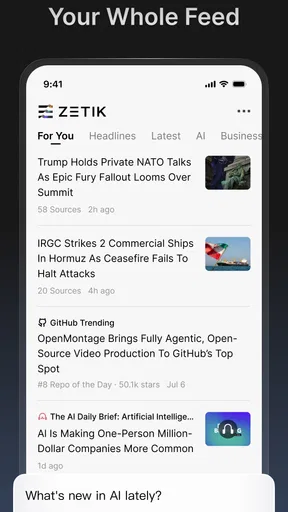
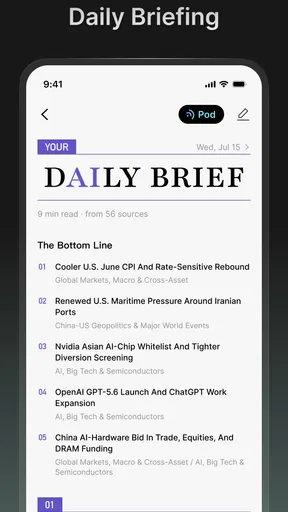
Alright, let’s dive into what makes this app tick. First off, the interface is slick and user-friendly. You don’t need a degree in tech to navigate it, which is always a plus. Just open the app, and bam! You’re greeted with a clean and organized layout that's easy on the eyes.
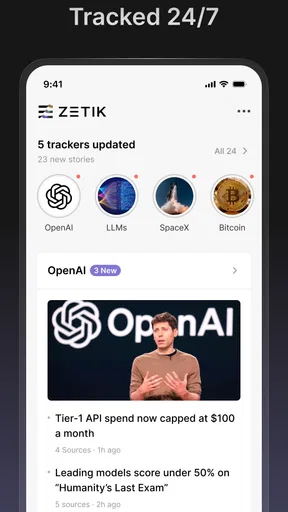
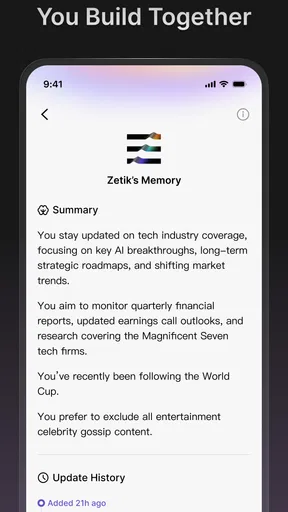
One of my favorite features is the customizable news feed. You can select categories or topics you’re passionate about, whether it’s tech, politics, entertainment, or sports. The app then tailors the news feed to suit your interests, ensuring you’re not wasting time on stories that don’t matter to you.
Another cool feature is the deep dive analysis. Unlike most news apps that just skim the surface, NewsBang offers in-depth articles with expert analyses and insights. It’s like having a conversation with someone who really knows their stuff, and it’s perfect for those of us who like to get into the nitty-gritty details.
Why You’ll Love It
Let’s be honest, we live in a fast-paced world where time is of the essence. NewsBang respects that by offering a feature called "Quick Reads". These are bite-sized summaries for when you’re on the go. It’s like grabbing a quick coffee shot of information!
Worried about missing out on important updates? The app has you covered with its smart notifications. It only alerts you about significant developments in your preferred categories, so you’re not bombarded with irrelevant pings every five minutes.
Choosing it alongside other news sources
Compared with a traditional newspaper app, which usually centers its experience on one publisher, this service is more about tailoring what you see across interests. Compared with a broad headline aggregator, its appeal is the combination of brief summaries and deeper reading. That makes it a better fit for someone who wants a guided way into stories than for a reader who prefers to scan a large, unfiltered stream or follow a single newsroom closely.
I would not make it my only source for urgent or high-stakes information. For a developing local event, a health decision, or a story where exact details matter, I’d check original reporting and more than one outlet. Personalization is convenient, but convenience is not the same as completeness. This is one of the most useful boundaries to set before relying on any recommendation-led news app.
The app is likely to suit people who want a calmer daily routine, enjoy both quick context and longer explanations, and are willing to tune their interests as they go. It is less suited to readers who want every headline as soon as it appears, need a specialist research archive, or prefer to follow one publication’s editorial voice from front page to opinion section. If that describes you, a publisher’s own app or a straightforward web browser may be a more direct choice.
Practical verdict
NewsBang has an average rating of 4.3 from 188 ratings, with 24 written reviews and over 10K installs. I see those figures as a sign that it has found an audience, not as proof that its feed will match every reader. The more useful test is whether its mix of summaries, topic selection, and deeper stories fits the way you actually read during a normal day.
In a world overflowing with information, NewsBang: Deep Dive News Daily is a breath of fresh air. It’s perfect for anyone who wants to stay informed without feeling overwhelmed. Whether you’re a news junkie or just someone trying to keep up with the world, this app is worth checking out.
So, if you’re tired of the chaos that comes with traditional news apps, give NewsBang a whirl. It might just change the way you consume news, making it a more enjoyable and enlightening experience.
Pros
- User-friendly interface enhances readability.
- Comprehensive coverage of global news events.
- Customizable notifications for breaking news.
- Offline mode available for news reading.
- Minimal ads for an uninterrupted experience.
Cons
- Occasional lag in loading new articles.
- Limited regional news customization options.
- No dark mode for night reading comfort.
- Subscription required for premium features.
- Some users report minor app crashes.
FAQs for NewsBang: Deep Dive News Daily
What makes NewsBang: Deep Dive News Daily different from other news apps?
NewsBang: Deep Dive News Daily stands out due to its in-depth analysis and comprehensive coverage of global events. Unlike traditional news apps, it emphasizes context and detailed reporting, providing users with a richer understanding of the issues. Additionally, the app curates content from diverse sources to ensure balanced perspectives.
Is NewsBang: Deep Dive News Daily free to use?
Yes, NewsBang offers a free version that includes access to top news stories and basic features. However, for users seeking an ad-free experience and exclusive content, there is a premium subscription available. This paid option provides enhanced features such as personalized news feeds and expert opinion articles.
How does NewsBang ensure the accuracy of its news content?
NewsBang prioritizes journalistic integrity by sourcing information from reputable and diverse outlets. The app employs a team of editors and fact-checkers who verify the authenticity of the content before publication. This rigorous process helps maintain high standards of accuracy and reliability for all reported news stories.
Can I customize the news topics I see on NewsBang?
Absolutely! NewsBang allows users to tailor their news experience by selecting preferred topics and interests. The app's intuitive interface lets you modify your settings to follow specific categories or regions, ensuring you receive updates on the stories that matter most to you. This customization enhances user engagement and satisfaction.
Does NewsBang offer offline reading capabilities?
Yes, NewsBang includes an offline reading feature, enabling users to download articles and access them without an internet connection. This is particularly useful for those who want to catch up on news while traveling or in areas with limited connectivity. Simply save your articles in advance to enjoy seamless offline browsing.


